Connecting
I can't see the OVERSIGHT WiFi
Check the relay is switched on and charged, with its antenna on. Give it 10 seconds after switching on. If a range officer renamed it, look for that name (for example OVERSIGHT-2).
The app says Lost base station or keeps disconnecting
Your phone has probably left the relay's WiFi for one with internet. Re-join it and choose to stay connected when the phone warns there's no internet. Turning mobile data off at the range also helps.
My target isn't in the list
Check the hub is switched on, charged, with its antenna on and standing up. If your range has two relays, you may be on the other relay's WiFi; a range officer may also have limited this relay's targets (Two relays).
Someone else's name is on my target
Another phone has taken it. Ask them to tap Leave; a phone that has walked away frees the target after about 3 minutes. Meanwhile Just watch shows the shots.
Shots
Shots don't show up
Check the bullet is supersonic at the target (above about 1,150 fps): subsonic loads and most .22 LR won't register. Check every pod cable is pushed fully into its jack. On a busy range, see Running the line: Very busy range or Ignore muzzle blasts can hide real shots, so step back one level.
A yellow or red message sits above the target
That's the app checking the target for you. A pod hasn't heard any of the last sounds: its plug is loose or its cable is damaged. Push the plug fully home, or swap its cable with a working pod's to see whether the fault follows the cable. Stuck on or firing far more often: the hub sees a short or a noisy pod; try another cable. Timing window: tap Send to hub. Pod positions don't match: open Settings, tap Fill for Lite mounts (or Fill corners for the frame kit), Save; if you measured your own positions, tap They're measured. Shots never reached the relay: raise the hub's antenna or the relay.
Shots stop counting when a pod is out
By default a shot needs 4 of the 5 pods. With only 3 the app can't check the shot, and a stray from the next lane can land in the middle of your target. To keep shooting until you can swap the pod, set Settings › Calibration › Pods that must hear a shot to 3 of 5: those shots are drawn as dashed rings. Set it back afterwards.
Shots appear when nobody shot at my target
Those are other shooters' muzzle blasts. Go to Settings › Trigger: try Busy range, then turn on Ignore muzzle blasts, and tap Send to the target hub.
Shots land in the wrong place, or jump about
Check each pod is on the base with its mark and plugged into the jack with the same mark (TL1, BL2, C3, BR4, TR5). Check Settings › Frame and sensors matches your target size and that you tapped Fill for Lite mounts. A loose or knocked pod: re-seat it, or clip on the spare.
Groups read bigger than on the paper
The sensor spacing was probably filled with Fill corners + bottom centre. Enter your target size and tap Fill for Lite mounts, then Save.
The whole group sits off from where it is on paper
Calibrate the centre (below).
The battery lights don't come on
They only light while the box is switched on or plugged in, and on battery they flash once every 10 seconds. Plug the USB-C charger in: the lights should fill up. If they still stay dark, the box may be older than the battery lights or need a firmware update (Firmware updates).
Shots from the next lane land on my target
Make sure all 5 pods are firing (see the message above the target, or Stats › Diagnostics). If they still get in, set Settings › Calibration › Ignore hits near the edge to 3 to 5 in: only the middle of the frame then counts.
A pod was hit
The target keeps working on four pods. Clip the spare onto that base and plug it into the same jack. Replacement pods are in the shop.
Calibrating the centre
- Hang a paper target and fire a 3 to 5 shot string at its centre.
- Measure the paper group's centre from the target centre: right and up are positive.
- Enter it in Settings › Calibration (Target centre offset X and Y) and Save.
Set offset from calibration shots does it in one tap, assuming the current string's centre is the true centre of the target.
Diagnostics mode
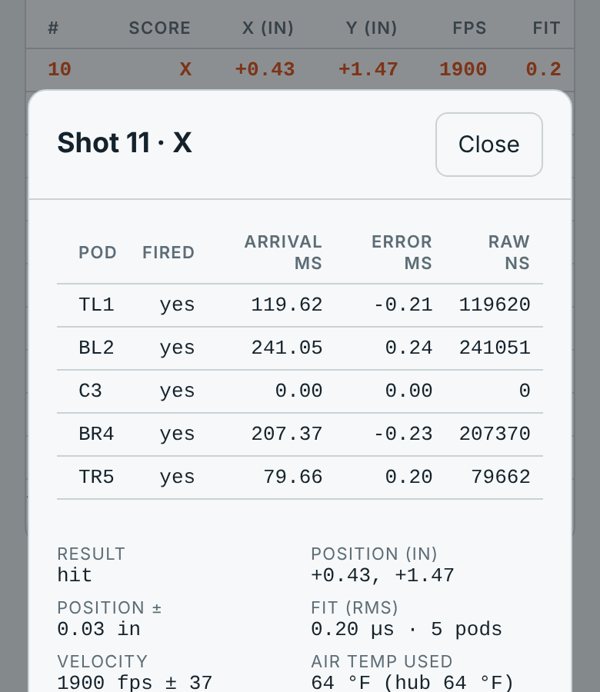
Turn on Settings › Display › Diagnostics mode. Then:
- Tap any shot in Shots to see each pod's arrival time and timing error, the shot's fit, velocity, air temperature, radio signal and hub battery.
- Stats gets a Diagnostics card with every pod's health: how often it fired and its mean and RMS error. A pod whose errors are consistently above 3 µs is probably not where Settings says, or is loose.
- Show ignored sounds puts the sounds the app left out on the target, so you can see what the range noise is doing.
Sending us data
- With Diagnostics mode on, fire a string that shows the problem.
- In Stats, tap Export debug data (every raw shot, the settings and the radio link), and Export CSV for the string.
- Email both to info@oversighttargets.com with a photo of the setup and what you expected. We'll reply within one business day, often with settings to try.
Still stuck?
Email info@oversighttargets.com with what you see and, if you can, a photo of your setup or the app's debug export (see Sending us data). We reply within one business day.